How to make and print Bitmoji Stickers
What is a Bitmoji?
A Bitmoji is a like a fun avatar you can customize. Most notable for its use in Snapchat but now has taken over with some great education uses as well. (Warning: Bitmoji does include suggestive images and language !) but the images can have awesome classroom uses.

How Do I make my Bitmoji?
Downloading the Bitmoji chrome extension is the easiest way to get your Bitmojis to save as images (just COPY and paste!).
Using the app or Snapchat customize all of the features to create a realistic Bitmoji version of yourself.
Supplies needed to make Bitmoji stickers:
- Bitmoji
- Sticker Paper/Labels
- 1.5 square labels are perfect
- Clear sticker paper works too (use Cricut to cut)
- Template (optional) if you are using labels
- Color Printer

Instructions to make Bitmoji Stickers
- Get the Avery 22805 Template (if you get a different size search by Template number). These are 1.5″ square labels. I used clear sticker paper and didn’t like the clear background labels. The white backgrounds would look and show better for using on student work.
Click Download as guest and you can download right away.

Copy Bitmoji from extension and paste into template. Upon pasting – drag the size of the image smaller until it fits in the box.

Load the sticker paper correctly in printer and VOILA!
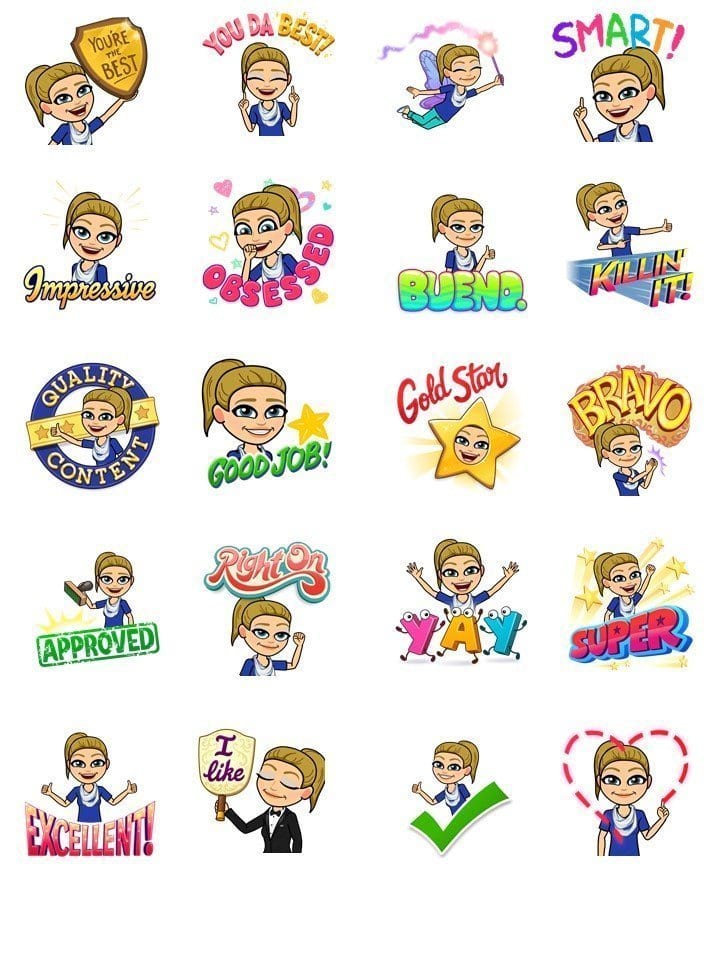
Use Bitmoji Stickers on:
- Feedback/Papers for students!
- Student Planners
- Your teacher planner
- print on longer labels to assign students groups
- print to assign classroom materials. (all supplies with your bitmoji sticker belong to your class)
- Use to coordinate your classroom library!


6 Comments
Leave a Comment

Shoutout to these End of Year Student Awards, saving you time and brain power!
Here’s your guide for end of year student awards! If you have ever panicked about…

Teacher Appreciation Week 2021 Gift Guide- show your heart with ideas for what teacher really want!
Virtual Teacher Appreciation 2021 or in person teacher appreciation day or teacher appreciation week –…

Your virtual teacher appreciation idea! Staff egg hunt with distance teaching rewards
Virtual teacher appreciation ideas for 2021 are the BEST! Here’s a fun online virtual staff…

Virtual reward idea – student egg hunt for distance learning spring activity in your classroom
Virtual or distance learning rewards are a great student motivator. This reward idea for students…
Surprise your Eyes with the ULTIMATE Amazon Prime Day 2020 for Teachers or Educators Guide
The Prime Day 2020 guide for teachers is here!! These are the Amazon Prime Day…

Survival, Love, Heroes….oh the themes! All the best Theme teaching ideas!
Teaching theme in upper elementary?! At first, I thought this would be a daunting task.…
Can you tell what type of printer you used to print the stickers on?
I used a regular inkjet printer (home printer) to print the Bitmoji stickers
Can we print stickers of 2 bitmojis together like for example my mother bitmoji and mine? Together
If you remove background of both and layer you can print – making sure you stay within bounds of the stickers or if using sheets of sticker paper you can just cut around.
can you create it with 2 people
Great question Candace! To be honest, I haven’t tried it myself but I would take the bitmoji images and remove background and add them together and should be able to print and use the same way. I use Remove.bg to take out backgrounds easily!